Skip to content
  • CMP 170HX is a strong (when unlocked) card

    GPUs & Accelerators
    1
    0 Votes
    1 Posts
    9 Views
    F
    So, Nvidia released the CMP series of cards long ago, targetting the crypto craze from back them, these are pretty much locked down A100's, but locked to low PCIe lanes on an old revision, bad compute for pretty much anything else and only 8-10GB of VRAM. Now, these cards do phisically have better capabilities, and they can get back the VRAM and the compute, although they still lack in PCIe speeds. Unlock instructions (repo) here: https://github.com/amoghmunikote/cmpunlocker
  • Unlock your GPU for free performance (RTX 20/30/40)

    GPUs & Accelerators
    1
    0 Votes
    1 Posts
    3 Views
    F
    Nvidia shipped consumer GPUs with a limited number of tensor cores activated, so their server cards could actually compete for the price. Unfortunately, someone ported the CMP unlocker's exploit to these other cards and used it to forcefully unlock said tensor cores, resulting in dramatically better performance for bf16 (1.5x-2x more). Repo link: https://github.com/Zagitta/gpu-unlock
  • Drafters are important

    Local LLMs
    1
    1
    0 Votes
    1 Posts
    15 Views
    F
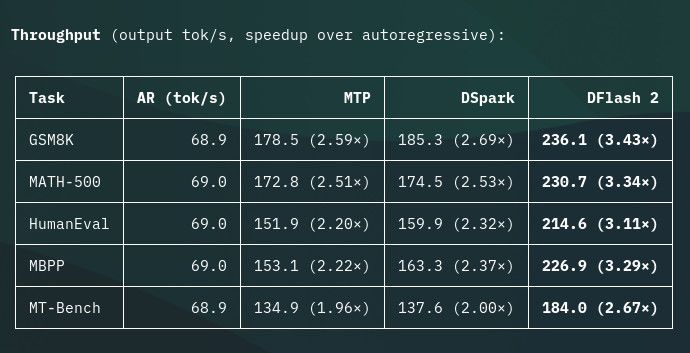
    So, drafters pretty much give (almost) free token generation output, in exchange for a little bit of VRAM (and some very minor prompt processing speed). There's 3 'popular' architectures for drafters ATM: MTP, the most used by far, usually comes with the weights if the model supports it, lowest VRAM usage. DSpark, deepseek's current format, performs better but uses more VRAM. DFlash2, by far the best option, outstanding performance. Rough baseline numbers: [image: image.jpeg]
  • 8-bit KV Cache on Ampere

    Quantization & Formats
    1
    0 Votes
    1 Posts
    12 Views
    F
    When using vLLM on Ampere GPUs, you may see that when selecting 8bit quantization formats for kv cache (fp8, int8) it falls back to other inference engines (Flashinfer, Triton Attention). In my experience, Triton Attention performs very poorly on Ampere, especially on higher contexts, and Flashinfer doesn't work with DFlash2, which is most likely why these alternatives were made: (both available in the HyperQwen repository). For FP8 KV Cache -> There's a fork of Flash Attention 2 with fp8 kv cache. For Int8 KV Cache -> Use the 'PTH' option in HyperQwen. In my experience, FP8 performed better at prefill and Int8 performed better at decode, both work with DFlash2 with solid results.
  • Nanobot

    Agents & RAG
    1
    0 Votes
    1 Posts
    60 Views
    F
    It's the agent I use day to day. Solid, lightweight and doesn't have many dependencies. https://nanobot.wiki/
  • What's an MoE, and why should I care?

    Local LLMs
    1
    0 Votes
    1 Posts
    60 Views
    F
    You may see some language models described as MoE, short for Mixture of Experts. The name sounds complicated, but the basic idea is simple: instead of using the same parts of the model for every word it writes, an MoE model picks a few specialized parts to help with each piece of text. Imagine a team of specialists Think of the model as a team with many specialists. When it processes a piece of text, it routes that piece to a few of them. Different specialists may end up handling different pieces. The model combines their work to produce its response. A regular dense model is more like asking the whole team to work on every piece. An MoE model uses only part of its team at a time. Why does that matter? Model names often show two sizes, such as “X billion total parameters, Y billion active.” Parameters are the learned values that make up a model: Total parameters is roughly the size of the whole team. Active parameters is roughly how much of the team is working on each piece of text. The active number can help explain how much work the model does to generate each piece. But it does not tell you how much memory the model needs. The runtime still needs access to the model’s weights, including experts that may not be used for every piece. So an MoE model with a small active number can still have a large download and need a lot of memory. Will an MoE run faster? Not necessarily. Using only some experts at a time can reduce the amount of calculation for each piece of text. But speed also depends on your hardware, the model, and whether your runtime supports that MoE well. The experts’ weights still need to be available, and moving them around can take time. What should I check? Before downloading an MoE model, check: The actual file size for the version you want. A smaller, quantized file uses less storage and usually less memory for weights, though it still needs extra room to run. Whether your runtime supports that model. How much VRAM and system RAM you have. Leave room for the conversation length (the context) and the runtime itself. Reports from people using similar hardware and settings.
  • New to Local LLMs? Start here!

    Local LLMs
    1
    0 Votes
    1 Posts
    64 Views
    F
    Welcome! This guide will teach you the basics for large language models (LLMs) running on your own hardware. LLMs are used for generating text, so it will be useful for coding, chatting and so on. 1. Know the basics We will use some terms that might be new to you so here's a simple definition for each: Model weights: The learned numerical values that define a model. Token: What the LLM perceives as a "piece of text". Can be a word, part of it, or something else. Parameters: Learned values that make up the model. Quantization: Storing model weights at lower precision to reduce memory usage, for example, Q4_0 uses ~4 bits per weight. Context: Amount of tokens that a model can remember. KV cache quantization: Reducing the precision of the context. 2. Choosing an engine The inference engine is the program that loads the model, and serves it to your tools. Here are some baseline recommendations. llama.cpp: Simplest to use, has a WebUI, lots of support. There almost always is a better option or atleast a fork that better suits your workload (especially on MoE's), but a good starter nonetheless. vLLM: The gold standard, supports almost any model but picky on hardware, awesome concurrency but lacks good offloading, lets you pick between many kernels (Flash Attention, Flashinfer, ...). Note: there are many many more options, if your card has good support consider using engines specifically for your hardware (e.g. ninfer, halogen). 3. Choosing a model Usually VRAM will be your limiting factor, so start by running a model that will comfortably fit in yours, remember that you have to fit the model weights + KV cache + runtime overhead. Also note that engines can only run specific model "packaging" formats, as an example: llama.cpp (and its forks) can run GGUFs. vLLM can run safetensors. For starters, to overcome this limitation, we will use: Quantization (4-6bit is a good baseline, includes Q4_K_M, Q6_K_XL, W4A16, ...). KV Cache quantization (8bit is a good baseline, includes q8, fp8, int8, ...). To improve our speeds we can also use drafting, although this will have a small VRAM penalty. You can also overcome this limitation by using MoE models instead of dense ones, explained here. 4. Actually running it If you plan on running multiple models on different engines, I recommend llama-swap, it simplifies greatly the process. As a tip, to configure these engines, don't just tell a model to "Optimize and run for X hardware". Instead, understand what the launch parameters do and specify it to the model, for example: "Install beellama.cpp latest on this machine and setup X model, use the Q4_K_XL and Q8 kv cache, I plan to have no concurrency, and I don't mind it loading slowly, make me a script to run it with and without drafting".
  • New to Local AI? Start here!

    Announcements
    1
    0 Votes
    1 Posts
    103 Views
    F
    Welcome to AIRigs! This is a forum for people to share useful information regarding AI inference and training. As long as you don't have an awfully outdated piece of hardware, you should be able to run very capable models inside the hardware you already own, or maybe splurge some money to get solid intelligence. Registration Also, while you're at it, you should make an account and add your hardware rig so others can help you in your specific setup. Go to profile icon → Settings → Rig to add your hardware. See an example Rig profile here. What do I need? Well, as mentioned before, most likely your current hardware will suffice, but you need to understand what specs makes hardware good for inference (or horrible): GPU memory (VRAM) is usually the most important,, the model should fit experts (on an MoE) or entirely (on a dense model) in the VRAM. "CPU" Memory (RAM) is important if you're offloading an MoE. Usually whatever the GPU can't fit will go here. Bandwidth applies to both VRAM and RAM, bigger models need more bandwidth. TFLOPs meaning Trillion FLOating Point operations per second roughly represent the raw speed of your hardware. Some other self-explanatory stuff does apply aswell such as driver support, power consumption, natively supported operations, which we won't go into detail here. As you might have realized by now, GPUs are (at this moment) the most viable way to run Local AI, so we will mostly focus on these. Ok so, what do you want to run? We have categories in the forum for many types of "Local AI", and working on adding solid beginner tutorials for each. Chat, coding, and text generation: large language models (LLMs) Image or video generation: diffusion and video models Speech: transcription, text-to-speech, and audio models Image or document understanding: vision-language and multimodal models Note: Tutorials might be missing since this is still a WIP
  • Strata: Run decent models on small hardware

    Runtimes & Serving Stacks
    1
    0 Votes
    1 Posts
    58 Views
    F
    Well someone finally made a decent engine for (smaller) MoE's such as Qwen 3.8 Flash Next for hardware that mere mortals can also own. Link here The numbers provided in the repo's README file are impressive, I hope there's more work put into this. Unfortunately it only works on NVIDIA GPUs, and also has barebones support for multi-GPU setups.
  • Modified NVIDIA GPUs

    GPUs & Accelerators
    1
    0 Votes
    1 Posts
    75 Views
    F
    Some gpu "labs" are modifying NVIDIA GPUs to get way more VRAM on them. Probably still one of the best options for the money, but fairly risky. NOTE: AFAIK the 5090 96GB are FAKE, do NOT buy them. Beware of scammers! You can find these GPUs easily on eBay or Alibaba for solid pricing, the ones I know of are: RTX 2080ti 22GB RTX 3080 20GB RTX 4080 32GB RTX 4090 48GB I myself own 2x RTX 3080 20GB and am very impressed with the results, they are real, and do exist, but don't have working ReBAR support (although a fix for this is discussed here, this majorly affects tensor parallel setups (multi-gpu), I highly recommend this tweak). The performance I get seems right, about 80tk/s under heavy context load on Qwen 3.8 27B using this quant with 256k ctx and vision enabled (with MTP).
  • Stop using Ollama, please.

    Runtimes & Serving Stacks
    1
    0 Votes
    1 Posts
    41 Views
    F
    Ollama is one of the easiest ways to get started with local models: install it, pull a model, and run it with a simple command. That convenience is valuable, especially when you’re new to local inference. But ease of setup doesn’t automatically make a tool the best fit for every model, machine, or workflow. I highly recommend reading this article: Friends Don’t Let Friends Use Ollama — Sleeping Robots Ollama’s convenience no longer outweighs its drawbacks. It obscures its reliance on llama.cpp, can lag behind other runtimes in performance and model support, and adds friction through its model packaging and configuration. I’m also concerned by its cloud pivot and the distinction between local and hosted inference. For more control and broader compatibility, I recommend trying other runtimes that better fits your hardware.
  • Hardware specs website

    GPUs & Accelerators
    1
    0 Votes
    1 Posts
    33 Views
    F
    Made a website to compare hardware easily and graph options. https://hw.fedesito.me Enjoy! Data is mostly from https://www.techpowerup.com
  • Qwen 3.8 Flash Next on RTX 3090's

    Throughput & Latency
    1
    0 Votes
    1 Posts
    61 Views
    F
    I FEEL like this is too good to be true, runs a patched vLLM on 2 RTX 3090's: GitHub recipe Numbers are absolutely insane. Something more in-line with what I'd expect is what Minachist achieved: HF discussion Blog post
  • EXL3

    Quantization & Formats
    1
    3
    0 Votes
    1 Posts
    51 Views
    F
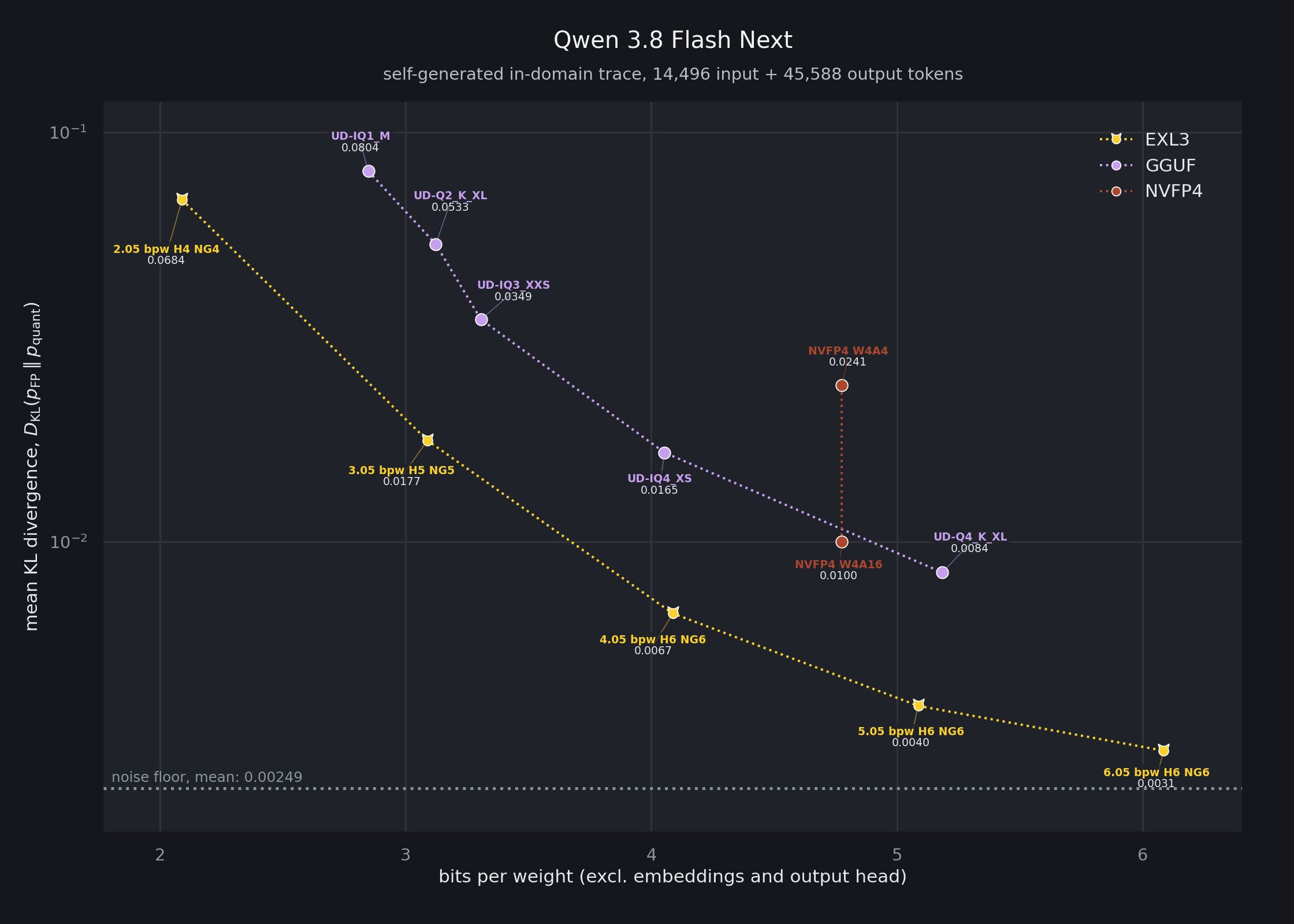
    Seems to be objectively one of the BEST quantization formats as of now, with the added benefit that the inference engines run much better than llama.cpp (GGUF) for CPU offload. For example, numbers on Qwen3.8-Flash-Next-exl3: [image: image.jpeg] [image: image.jpeg] [image: image.jpeg]
  • ReBAR "alternatives" for modified GPUs

    Drivers, CUDA & ROCm
    1
    0 Votes
    1 Posts
    58 Views
    F
    So, I have 2x RTX 3080's with 20GB VRAM each (modified), and I saw that ReBAR is entirely broken on these cards. Fortunately, there is some sort of "fix/alternative" to atleast get some of that performance back, although it's largely untested, found on this reddit thread, reading the messages from u/Difficult_Tip_6669. The repo mentioned on the reddit thread seems to have some PoC on how to get barlink working again, although the repository seems shallow and unmaintained. I do believe there is some sort of untapped potential here to get these cards some needed performance boost. Update: I got it working and made a script for it to be installed easily and working on vLLM/SGLang: https://github.com/fedes1to/nvidia-modded-p2p/
  • VLLM with mixed quantization

    Quantization & Formats
    1
    2
    0 Votes
    1 Posts
    60 Views
    F
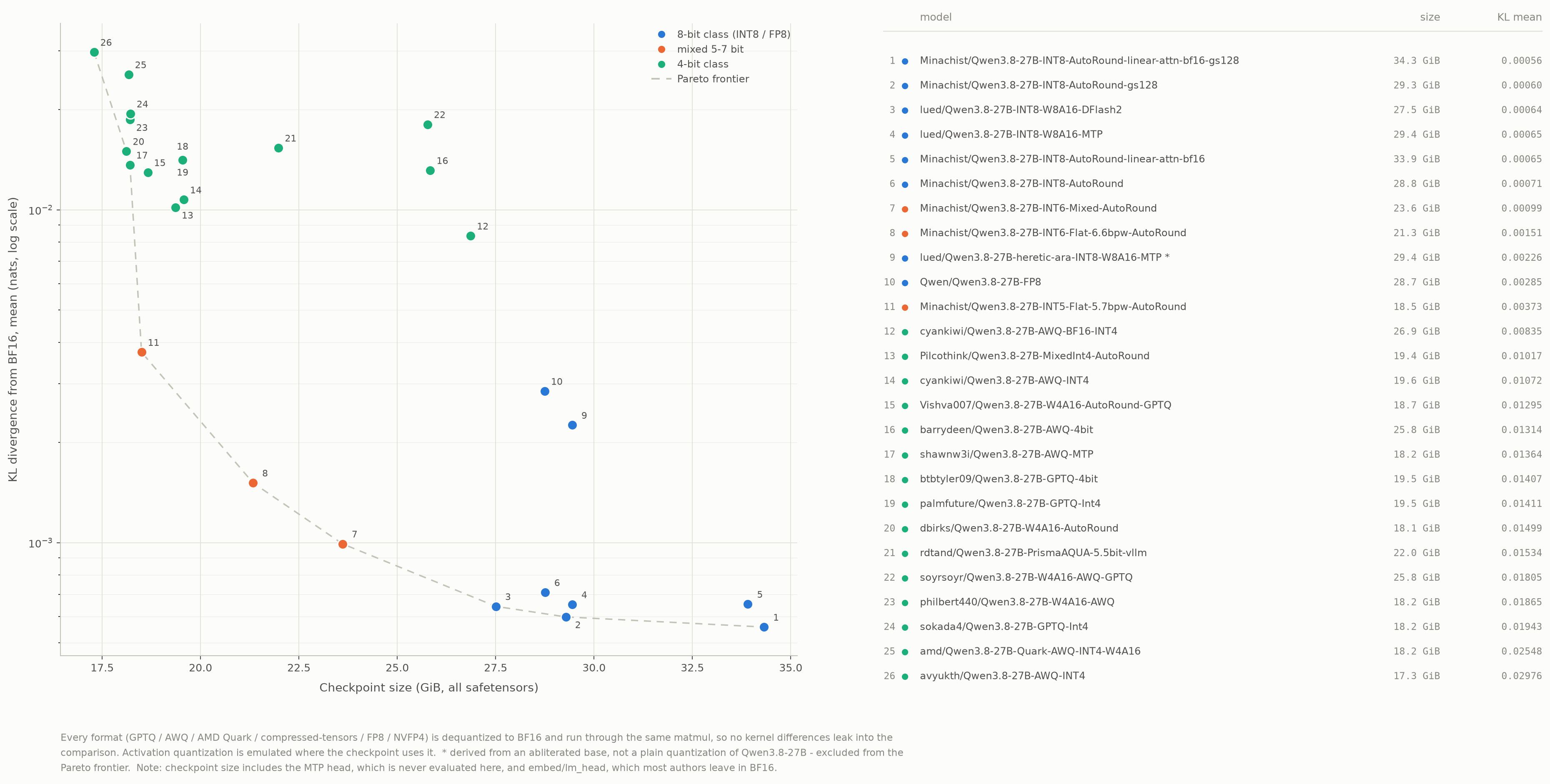
    Findings from Minachist's huggingface profile. Before anything, there's a really good blog post detailing the internals in Minachist's blog, found here. Turns out these quantizations are the best I've found (compared to their size, for vLLM) by a HUGE margin, (photos from the blog linked above): [image: image.jpeg] [image: image.jpeg] Sources (and good quantizations/resources): https://minamism.com/posts/vllm-int5-7-quantization/ https://huggingface.co/Minachist/Qwen3.8-27B-INT6-Mixed-AutoRound https://huggingface.co/Minachist/Qwen3.8-Flash-Next-INT4-Mixed-AutoRound
  • 0 Votes
    1 Posts
    42 Views
    F
    Links: lk-moe Lvllm Lsglang Open source implementation of lk-moe: xiaotu-moe These inference engines seem to implement features that greatly improve CPU and CPU offload performance with the NUMA parallel architecture, still to be tested, would appreciate benchmarks! (There are some numbers in the GitHub repos.)